Day-9:Advance Git & GitHub for DevOps Engineers.
Looking for an entry-level position to kickstart my career in a dynamic and progressive company through which I can contribute in design, developing and deploying software that have a purpose and play significant role in company’s growth.
Git Branching
Use a branch to isolate development work without affecting other branches in the repository. Each repository has one default branch, and can have multiple other branches. You can merge a branch into another branch using a pull request.
Branches allow you to develop features, fix bugs, or safely experiment with new ideas in a contained area of your repository.
Git Revert and Reset
Two commonly used tools that git users will encounter are those of git reset and git revert . The benefit of both of these commands is that you can use them to remove or edit changes you’ve made in the code in previous commits.
Git Rebase and Merge
What Is Git Rebase?
Git rebase is a command that lets users integrate changes from one branch to another, and the logs are modified once the action is complete. Git rebase was developed to overcome merging’s shortcomings, specifically regarding logs.
What Is Git Merge?
Git merge is a command that allows developers to merge Git branches while the logs of commits on branches remain intact.
The merge wording can be confusing because we have two methods of merging branches, and one of those ways is actually called “merge,” even though both procedures do essentially the same thing.
Refer to this article for a better understanding of Git Rebase and Merge Read here
In the Conceptual Overview section, we saw how a feature branch can incorporate upstream changes from main using either git merge or git rebase. Merging is a safe option that preserves the entire history of your repository, while rebasing creates a linear history by moving your feature branch onto the tip of main.
This use of git rebase is similar to a local cleanup (and can be performed simultaneously), but in the process it incorporates those upstream commits from main.
Keep in mind that it’s perfectly legal to rebase onto a remote branch instead of main. This can happen when collaborating on the same feature with another developer and you need to incorporate their changes into your repository.
For example, if you and another developer named John added commits to the feature branch, your repository might look like the following after fetching the remote feature branch from John’s repository:
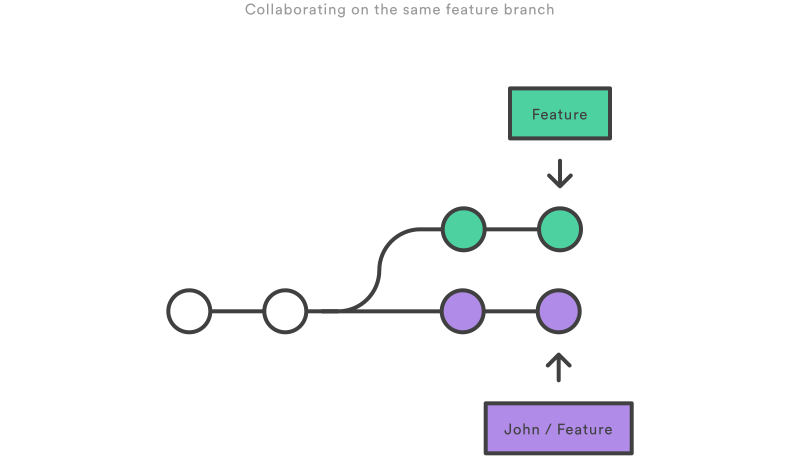
You can resolve this fork the exact same way as you integrate upstream changes from main: either merge your local feature with john/feature, or rebase your local feature onto the tip of john/feature.
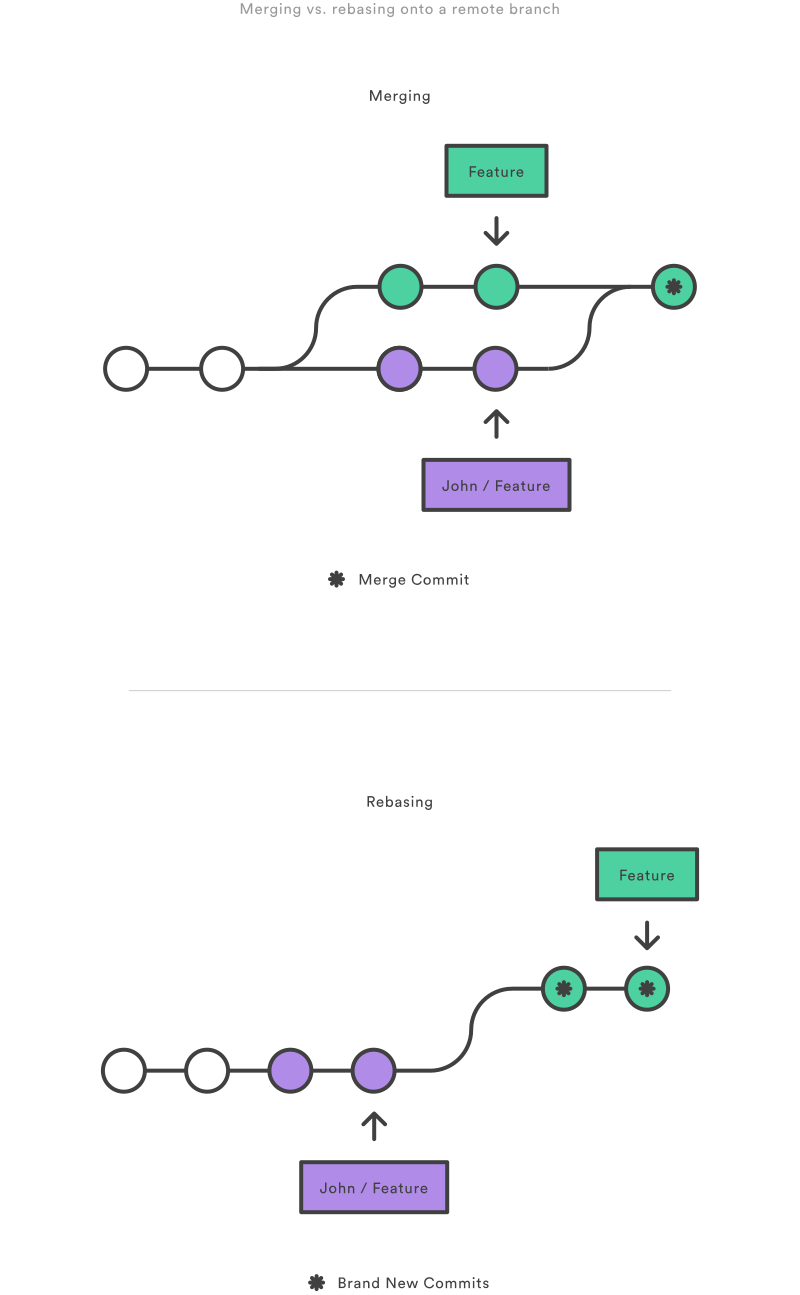
Note that this rebase doesn’t violate the Golden Rule of Rebasing because only your local feature commits are being moved—everything before that is untouched. This is like saying, “add my changes to what John has already done.” In most circumstances, this is more intuitive than synchronizing with the remote branch via a merge commit.
By default, the git pull command performs a merge, but you can force it to integrate the remote branch with a rebase by passing it the --rebase option.